
How to force SkyDrive to store your files on your hard drive in Windows 8.1
 07:04
07:04
 By
Unknown
By
Unknown


But for traditional PC users with big hard drives one thing that may not be so great is how Windows 8.1 works with SkyDrive.
To make Windows 8.1's deep SkyDrive integration more usable on a tablet, Microsoft decided to store most of your SkyDrive documents in the cloud and only download them locally when you need them.
That makes sense if you only have 32GB or 64GB of storage on a slate, but with a laptop hard drive of 500GB or more, it's less of an issue. It also makes more sense to keep a local copy at all times if you're doing regular backups to an external hard drive at home.
How to make SkyDrive files available offline in Windows 8.1
If you want to make sure all your SkyDrive files are always available locally and sync back to the cloud, there are two ways you can do it.The first is to open File Explorer and then right-click the SkyDrive icon in the left-hand navigation column. In the context menu, select "Make available offline." That will force SkyDrive to download all of your cloud-stored files to the local machine. (Warning: It might take a while if you're stashing a lot of stuff in SkyDrive.)
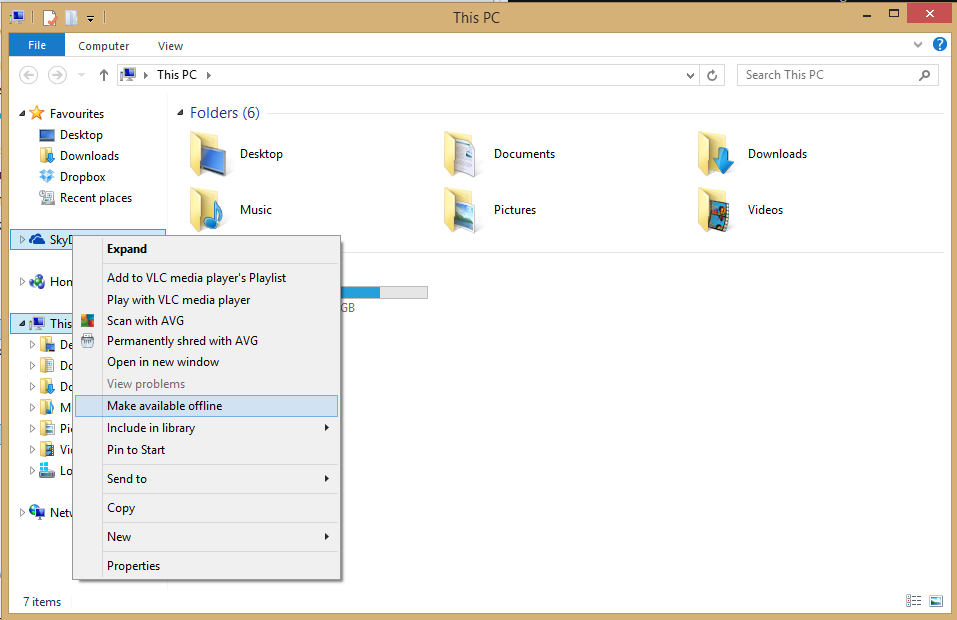

Either way you choose, all your SkyDrive files are now available to you on your local drive.

Written by Admin
ChromeGT is a modern, powerful and professional Blogger template made for your Portfolio, Business or almost any other kind of website.


0 comments: